
Create fantastic surveys, grow the participation rates of your community.

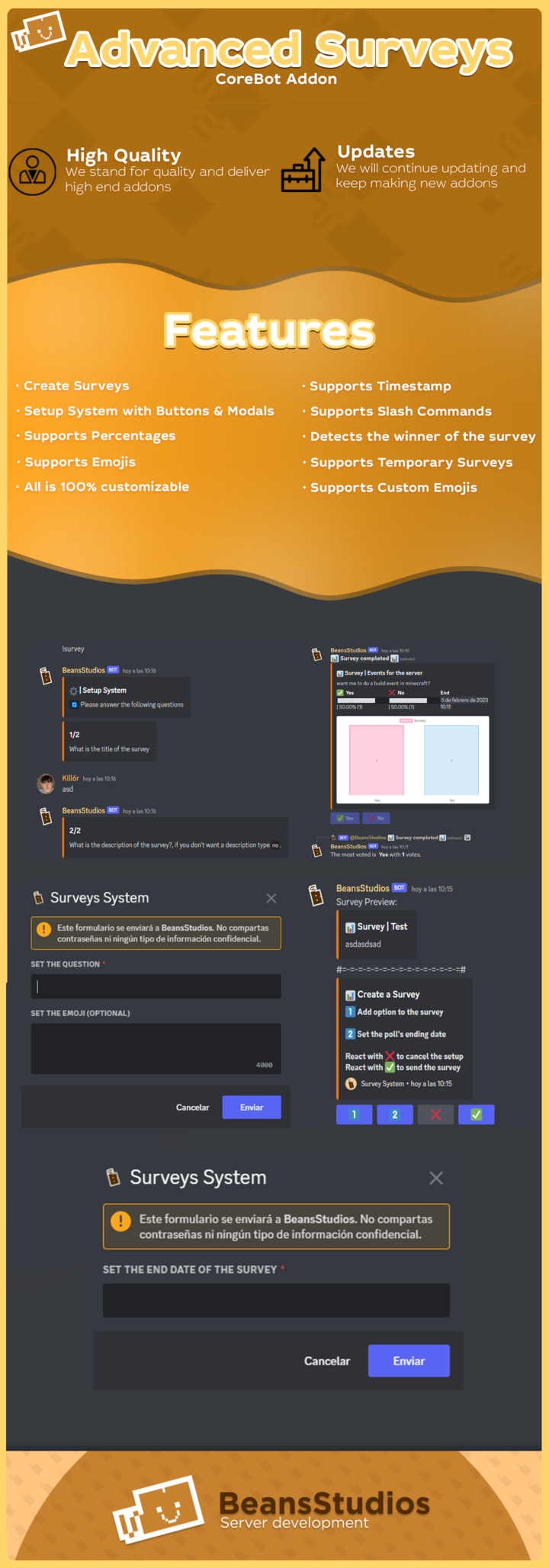
* Notice: Advanced Surveys will not run without a license key. You can receive your license key by checking on the official BeansStudio Discord server. Once you purchase the addon, head over to our Discord server, create a verification ticket, and then provide the information that the addon requests. Your key may be created automatically, or you may have to wait for a member of the administration to create a key for you.
YAML:
License: Key
Commands:
Setup Survey:
Name: survey
Description: To create surveys
Usage:
Title: What is the title of the survey?
Description: What is the description of the survey?
Text: You have to put the command `/survey` and then follow the instructions.
Messages:
Create Survey:
Title: 📊 Create a Survey
Description: |-
1️⃣ **Add option to the survey**
2️⃣ **Set the poll's ending date**
**React with ❌ to cancel the setup**
**React with ✅ to send the survey**
Create Survey 2:
Title: 📊 Create a Survey
Description: |-
1️⃣ **Add option to the survey**
✅ **Set the poll's ending date**
**React with ❌ to cancel the setup**
**React with ✅ to send the survey**
Survey:
Title: 📊 Survey | {title}
Fields:
- Name: "{emoji} {text}"
Value: "{load} | {percentage} ({number})"
- Name: End
Value: "{date}"
Image:
Status: true
Style: Bar
P.S: You can add for the moment only 2 Styles, Circle & Bar.
Title: Survey
Replys:
- The option has been added successfully
- The date has been successfully set
- You have successfully voted for **{vote}**
- You have successfully removed your vote for **{vote}**.
- The most voted is **{winner}** with **{votes}** votes.
- 📊 **Survey completed** 📊
Messages Error:
Survey:
- You have to add an option & set the time to send the survey
- "Ese formato no es válido. Ejemplo: ``1d1h1m``. **Inténtalo de nuevo presionando el
botón.**"
Error de comando:
Título: Error
Descripción:
"`❌` | Este comando solo se puede usar en barra, use `/survey` y
intentar otra vez."
Modales:
Título: Sistema de Encuestas
Textos:
- Establecer el emoji (Opcional)
- Establecer la pregunta
- Establecer la fecha de finalización de la encuesta
[/CENTRO][/CÓDIGO][/SPOILER][/CENTER]


