
Do you want to see messages deleted by users, but don't know how?
Then this addon is perfect for you.
This addon lets you to see last deleted message on selected channel using

Snipe message in
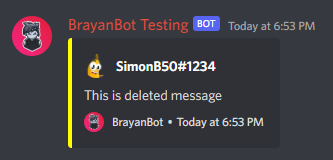
Snipe message in

NOTE:
All messages(and webhooks) are fully configurable and you can change it's look and content using configuration files.

This addon lets you to see last deleted message on selected channel using
snipe (channel) command.Snipe message in
NORMAL mode:Snipe message in
WEBHOOK mode:NOTE:
All messages(and webhooks) are fully configurable and you can change it's look and content using configuration files.
YAML:
# Define if addon is enabled
Enabled: true
# Snipe message mode
# Modes: NORMAL | WEBHOOK
Mode: WEBHOOK
# Snipe message webhook
# Only for WEBHOOK mode
Webhook:
  # Webhook name
  Name: "{author-name}"
  # Webhook avatar
  Avatar: "{author-pfp}"
# Roles/Users whose messages wont be saved in snipe database
Ignored:
  # Ignored Users
  Users:
    - SimonB50#1234
  # Ignored Roles
  Roles:
    - 🧰 | Admin
  # Should snipe system ignore bot messages
  Bots: true
# Max snipe history limit
SnipeLimit: 10
YAML:
# Snipe command
Snipe:
  # Command Name
  Name: snipe
  # Command Description
  Description: Check last deleted message in channel
  # Command Type
  Type: General
  # Command usage
  # THIS WONT CHANGE ANYTHING. Only for translation purposes!
  Usage: snipe (amount) (channel)
  # Command Aliases
  Aliases:
    - deleted
  # Roles with which users can use this command
  Permission:
    - "@everyone"
  SlashCommand:
    # Should SlashCommand be enabled?
    Enabled: true
    # SlashCommand data
    Data:
      # SlashCommand name
      Name: snipe
      # SlashCommand description
      Description: Check last deleted message in channel
      # SlashCommand options
      Options:
        - Type: integer
          Name: amount
          Description: Amount messages to skip when sniping
          Required: false
        - Type: channel
          Name: channel
          Description: Channel, which you want to check
          Required: false
YAML:
# Messages used by addon.
# Its RECOMENDED to use placeholders here.
Messages:
  # Snipe Message
  # Its recomended to use these placeholders:
  # - {author-?} - Message author variables
  # - {message} - Sniped Message
  Snipe:
    # Content: {message}
    Embeds:
      - Color: "#FFFF00"
        Author: "{author-tag}"
        AuthorIcon: "{author-pfp}"
        Description: "{message}"
        Footer: "{brand-name}"
        FooterIcon: "{brand-logo}"
        Timestamp: true
    DisableMentions: true
  # Errors Messages used by addon.
  Errors:
    # Error Message, which will be send if user wrongly use the command.
    # Its recomended to use {usage} placeholder, which will show command usage.
    WrongCommandUsage:
      Content: ⚠️ An error occured ⚠️
      Embeds:
        - Title: Wrong command usage!
          Color: "#FF0000"
          Author: "{brand-name}"
          AuthorIcon: "{brand-logo}"
          Description: "Usage: `{usage}`"
          Thumbnail: "{brand-logo}"
          Timestamp: true
    # Error Message, which will be send if user mentions invalid channel.
    InvalidChannel:
      Content: ⚠️ An error occured ⚠️
      Embeds:
        - Title: Invalid channel!
          Color: "#FF0000"
          Author: "{brand-name}"
          AuthorIcon: "{brand-logo}"
          Description: |-
            Provided channel is invalid
            > Check if you typed everything correctly and try again.
          Thumbnail: "{brand-logo}"
          Timestamp: true
    # Error Message, which will be send if there is nothing to snipe.
    NothingToSnipe:
      Embeds:
        - Title: Nothing to snipe!
          Color: "#FF0000"
          Author: "{brand-name}"
          AuthorIcon: "{brand-logo}"
          Description: There is nothing to snipe in this channel.
          Thumbnail: "{brand-logo}"
          Timestamp: true
    # Error Message, which will be send if given snipe count is too big.
    # Use {limit} placeholder to replace it with max snipe limit.
    SnipeLimit:
      Embeds:
        - Title: Snipe count too big!
          Color: "#FF0000"
          Author: "{brand-name}"
          AuthorIcon: "{brand-logo}"
          Description: You can't snipe more than {limit} messages.
          Thumbnail: "{brand-logo}"
          Timestamp: true
You can get support for this addon on:
- [Not recommended] SimonB50#1234's DMs


